> ## Documentation Index
> Fetch the complete documentation index at: https://docs.go.gbgplc.com/llms.txt
> Use this file to discover all available pages before exploring further.
# How to group document modules
> This guide outlines the best practice for grouping documents modules to ensure the needed results and prevent errors.
When designing a journey, the **Document Classification** module must always be the first documents module, as other modules depend on successful document classification to work properly.
There are two ways to group document modules in the Journey builder.
## Example 1: Evaluation node after classification module
You can use an evaluation node after the classification node, like this:
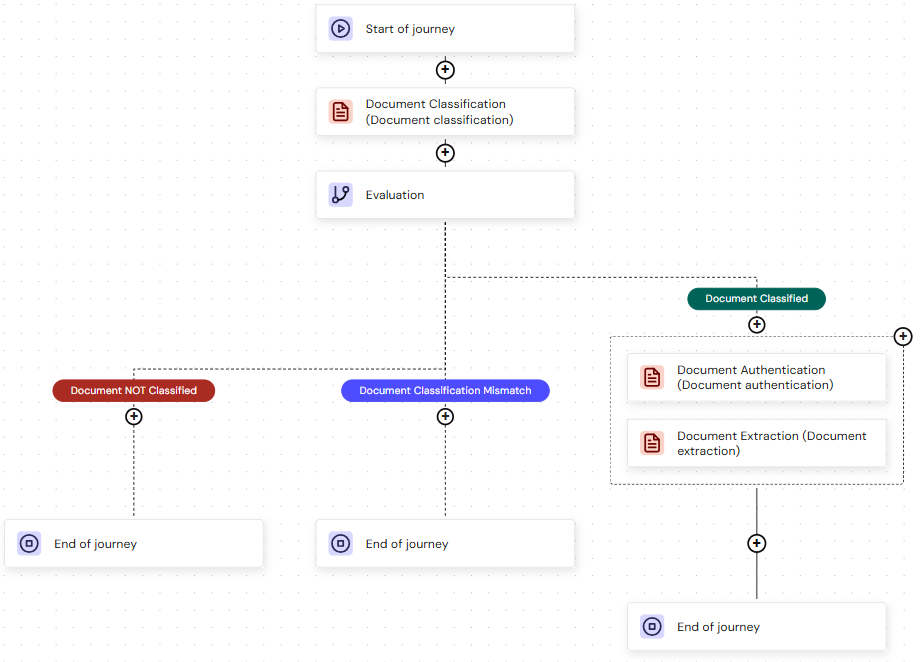 In the screenshot above, **Document Classification** comes first after the **Start of journey** node, an evaluation node follows next, and then **Document Authentication** and **Document Extraction** modules are grouped. If the document is classified, the document authentication and extraction modules run; otherwise, the journey ends.
## Example 2: Without an evaluation node after the Document Classification module
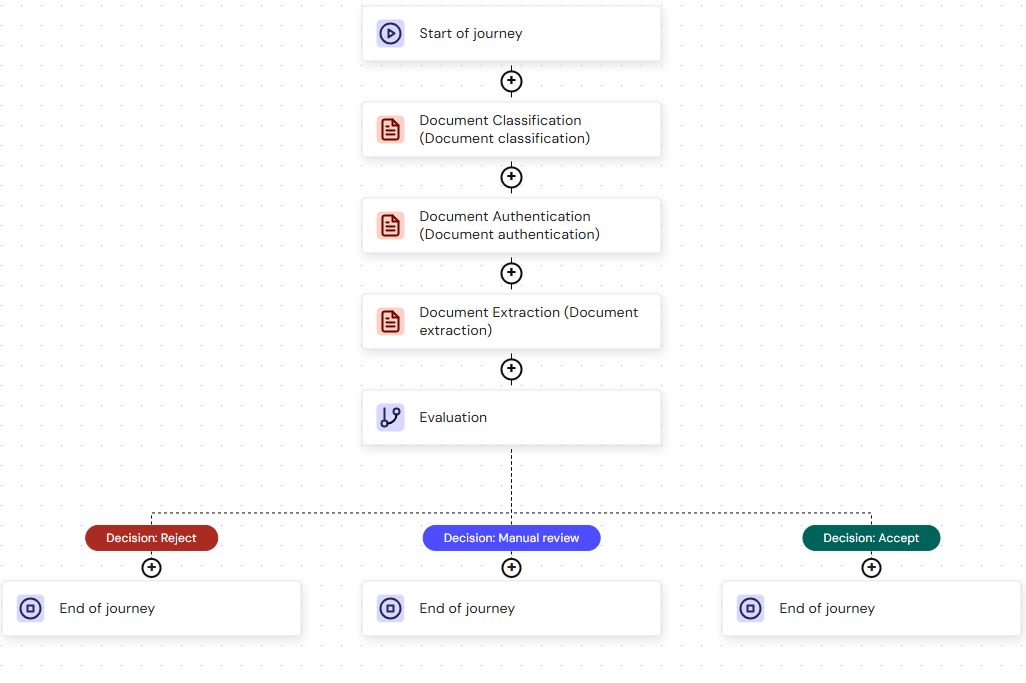
Document modules can be run without an evaluation node first, as described in the previous section. This time, classification runs first, followed by the remaining modules running simultaneously, with evaluation occurring after all modules complete, like this:
In the screenshot above, **Document Classification** comes first after the **Start of journey** node, an evaluation node follows next, and then **Document Authentication** and **Document Extraction** modules are grouped. If the document is classified, the document authentication and extraction modules run; otherwise, the journey ends.
## Example 2: Without an evaluation node after the Document Classification module
Document modules can be run without an evaluation node first, as described in the previous section. This time, classification runs first, followed by the remaining modules running simultaneously, with evaluation occurring after all modules complete, like this:
 ## Best practices for document module grouping
* Start with the **Document Classification** module. The module scans the submitted document to determine its type and validity.
* Add evaluation after **Document Classification**. You can include an evaluation step after the **Document Classification** module as a best practice. If a document is classified successfully, then the other modules run.
The module arrangements following Document Classification are provided as examples. Choose and order the document modules to best fit your use case.
Read the [Set up evaluation documentation](/docs/go-v2/platform/journey-builder/set-up-evaluation) to learn more about evaluations.
## Best practices for document module grouping
* Start with the **Document Classification** module. The module scans the submitted document to determine its type and validity.
* Add evaluation after **Document Classification**. You can include an evaluation step after the **Document Classification** module as a best practice. If a document is classified successfully, then the other modules run.
The module arrangements following Document Classification are provided as examples. Choose and order the document modules to best fit your use case.
Read the [Set up evaluation documentation](/docs/go-v2/platform/journey-builder/set-up-evaluation) to learn more about evaluations.