> ## Documentation Index
> Fetch the complete documentation index at: https://docs.go.gbgplc.com/llms.txt
> Use this file to discover all available pages before exploring further.
# Overview
> Access the GBG GO dashboard to manage verification workflows, create journeys, investigate sessions, and view analytics.
export const VersionWarningBanner = () => {
const [latestUrl, setLatestUrl] = useState(null);
useEffect(() => {
if (typeof window === "undefined") return;
const {pathname, hash, search} = window.location;
if (!pathname.includes("/go-v1/")) return;
setLatestUrl(`${pathname.replace("/go-v1/", "/go-v2/")}${search}${hash}`);
}, []);
if (!latestUrl) return null;
return ;
};
The GBG GO platform provides access to the core functionalities of the GBG GO system. The dashboard allows you to manage customer verification workflows, manage accounts, create journeys, view existing journeys, and more.
## Accessing the platform
To access the GBG GO platform, enter your login credentials on the GBG GO sign-in page. See the account creation and log in guide [here](/docs/go-v1/platform/journey-builder/access-gbg-go).
Once you are logged in, this is what the Customer journeys list looks like:
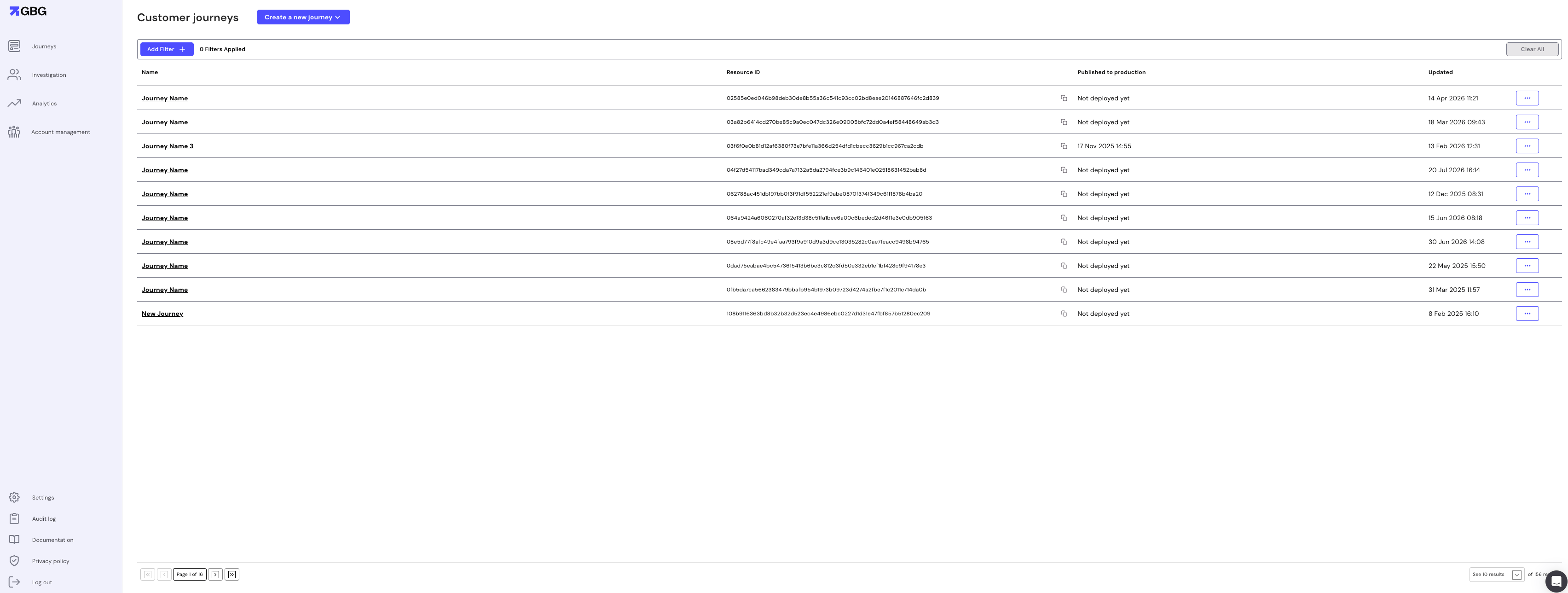 The Customer journeys list shows every journey in your organisation, with the following details for each:
* **Name**: The name given to the journey.
* **Resource ID**: The unique identifier for the journey, used to reference it when executing the journey through the API.
* **Published to production**: The date and time the journey was published to the production environment, or "Not deployed yet" if it has not been deployed.
* **Updated**: The date and time the journey was last modified.
## Key components
* **Journeys** - This feature allows you to create, design, configure, and manage verification workflows for onboarding customers, through the [journey builder](/docs/go-v1/get-started/glossary#journey-builder). You can create custom journeys or use pre-configured templates tailored to specific industries and compliance requirements.
* **Investigation** - The Investigation portal provides a comprehensive view of all customer journeys, allowing you to monitor and manage ongoing verification processes. You can view customer details, view journey sessions, and investigate any issues that arise during customer verification.
* **Analytics** - The Analytics section provides insights into customer verification processes, journey success rates, processing times, and other key metrics. This helps you optimize your verification workflows and improve customer experience.
* **Account Management** - Administer user accounts, assign roles and permissions, manage departments, and configure licensing for modules and variants. For more insights, check out the [Account management documentation](/docs/go-v1/platform/account-management/overview).
* **Settings** - The Settings section allows administrators to configure system-wide parameters for the GBG GO platform. Here, you can manage data retention policies to control how long different types of customer data are stored before deletion and configure GBG assistance access.
* **Audit Log** - The Audit Log section provides a comprehensive record of all activities performed within the GBG GO platform. It displays timestamped entries showing which users performed specific actions on journeys, such as creating journeys from templates, making query builder changes, or updating drafts.
The Customer journeys list shows every journey in your organisation, with the following details for each:
* **Name**: The name given to the journey.
* **Resource ID**: The unique identifier for the journey, used to reference it when executing the journey through the API.
* **Published to production**: The date and time the journey was published to the production environment, or "Not deployed yet" if it has not been deployed.
* **Updated**: The date and time the journey was last modified.
## Key components
* **Journeys** - This feature allows you to create, design, configure, and manage verification workflows for onboarding customers, through the [journey builder](/docs/go-v1/get-started/glossary#journey-builder). You can create custom journeys or use pre-configured templates tailored to specific industries and compliance requirements.
* **Investigation** - The Investigation portal provides a comprehensive view of all customer journeys, allowing you to monitor and manage ongoing verification processes. You can view customer details, view journey sessions, and investigate any issues that arise during customer verification.
* **Analytics** - The Analytics section provides insights into customer verification processes, journey success rates, processing times, and other key metrics. This helps you optimize your verification workflows and improve customer experience.
* **Account Management** - Administer user accounts, assign roles and permissions, manage departments, and configure licensing for modules and variants. For more insights, check out the [Account management documentation](/docs/go-v1/platform/account-management/overview).
* **Settings** - The Settings section allows administrators to configure system-wide parameters for the GBG GO platform. Here, you can manage data retention policies to control how long different types of customer data are stored before deletion and configure GBG assistance access.
* **Audit Log** - The Audit Log section provides a comprehensive record of all activities performed within the GBG GO platform. It displays timestamped entries showing which users performed specific actions on journeys, such as creating journeys from templates, making query builder changes, or updating drafts.